Support webhooks
Helpin support webhooks allow you to subscribe to real-time events that occur across your support operations. Located under Settings -> Support -> Webhooks, this feature pushes cryptographically signed JSON payloads over HTTPS to your destination endpoints as actions unfold.
Webhooks provide the foundation for custom integrations, event-driven internal automation (such as Zapier or Make workflows), operational dashboards, data warehouses, and bi-directional ticketing syncs.
Webhook architecture
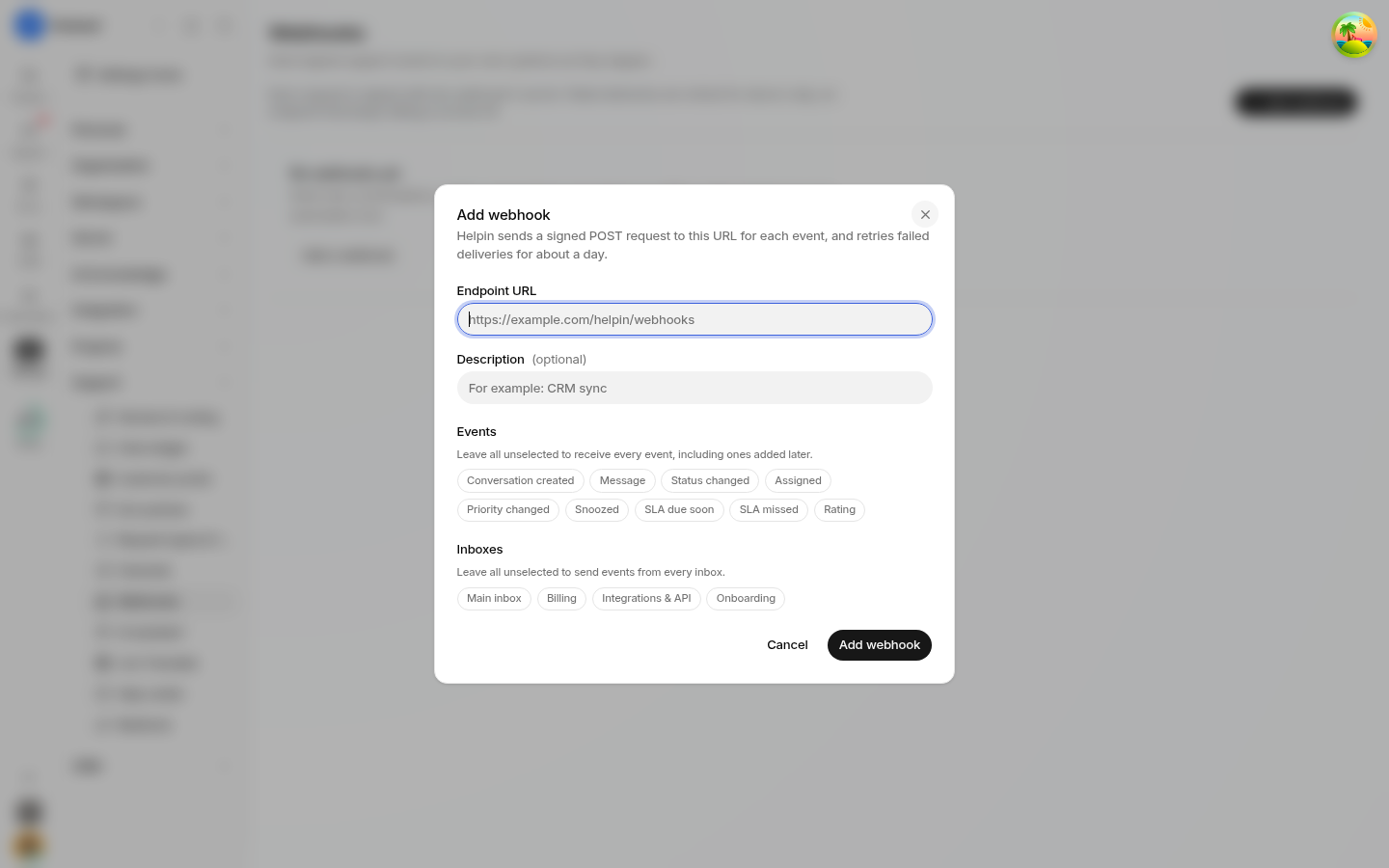
Support webhooks are configured at the workspace level, capturing events across all team inboxes and channels:
Endpoint destinations: You can create multiple webhook endpoints, each pointing to a distinct HTTPS URL.
Selective subscriptions: Each endpoint specifies the exact list of event types it wishes to receive.
Payload delivery: Whenever a subscribed event occurs, Helpin immediately issues an HTTP
POSTrequest containing the event metadata and affected resource payload.
Supported event types
Helpin supports exactly nine support webhook event types. You can subscribe to any subset of these events per endpoint:
Event Type | Trigger Description |
|---|---|
| A customer or teammate initiates a new conversation across any channel. |
| A customer, a human teammate, or Helpin AI posts a public reply to a conversation. |
| A conversation transitions between lifecycle states ( |
| A conversation is assigned to a teammate, reassigned, or unassigned. |
| A conversation's priority level is raised or lowered (Low, Normal, High, Urgent). |
| A teammate actively snoozes a conversation until a specified future date/time. |
| An active conversation target reaches its configured warning lead time threshold. |
| A conversation breaches its first response, next response, or resolution target time. |
| A customer submits a satisfaction score or rating on a resolved conversation. |
Endpoint security and payload verification
To ensure incoming webhook deliveries originate from Helpin and have not been tampered with in transit, Helpin cryptographically signs every outgoing HTTP request.
Signing secrets and headers
When you register an endpoint, Helpin generates a unique signing secret dedicated to that specific endpoint:
Helpin computes an HMAC signature of the raw request payload using your secret and includes it in the request headers (e.g.,
X-Helpin-Signature).Your receiving server must independently compute the HMAC digest of the raw incoming request body and verify that it matches the header signature before processing the event.
Never trust incoming webhook payloads without verifying the cryptographic signature.
Secret rotation
If you suspect a signing secret has been exposed, or if your organizational security policy mandates periodic credential updates, you can rotate the secret directly from the endpoint settings in Helpin:
Rotating the secret immediately invalidates the previous secret and provisions a new one.
Update your server's environment configuration with the new signing secret to prevent delivery validation failures.
Testing, logs, and redelivery
Helpin provides robust debugging tools within the webhooks dashboard to help developers build and maintain resilient listeners.
Test payloads
Before pointing an endpoint at production code, use the Send test payload tool on the endpoint page. Helpin sends a simulated event payload to your endpoint URL so you can verify network reachability, firewall rules, and signature verification logic.
Delivery logs
Every delivery attempt is recorded in the endpoint's delivery log:
HTTP response status: View the status code returned by your receiving server (e.g.,
200 OK,404 Not Found,500 Internal Server Error).Timestamps: Inspect exact dispatch times and round-trip response latencies.
Request and response bodies: Review the JSON payload sent by Helpin and the response body returned by your server.
Manual redelivery
If your server temporarily drops connections, encounters downtime, or returns a 5xx error code, the delivery is marked as failed. You can inspect the failed delivery record in the log and click Redeliver to immediately re-dispatch the exact payload to your endpoint.
Designing idempotent consumers
Because network anomalies can cause retries, and manual redeliveries can be triggered from the console, webhook deliveries may occasionally arrive more than once.
To prevent duplicate actions in your downstream systems (such as creating duplicate tickets in an external CRM or posting multiple Slack alerts):
Use event identifiers: Each webhook payload includes a unique event ID and timestamp.
Idempotency keys: Store processed event IDs in an atomic cache or database table.
Deduplication: When your webhook handler receives a request, verify whether the event ID has already been processed. If it has, immediately return an HTTP
200 OKstatus and discard the redundant execution.
Permissions
Managing webhook subscriptions is restricted to workspace administrators:
Support Admin: Required to create endpoints, update destination URLs, modify event subscriptions, rotate signing secrets, dispatch test events, and trigger manual redeliveries.
Support Read: Teammates can view existing endpoints and delivery logs.
Related pages
Inbox scoping
A webhook endpoint also chooses which inboxes it hears from. Selecting specific inboxes lets you send, say, only Billing conversations to a finance system while another endpoint receives everything. Leave all inboxes selected for a workspace-wide feed.
Was this article helpful?