AI support agent overview
Helpin's AI support agent answers customer questions directly from your knowledge sources, cites where answers came from, asks clarifying questions when a request is ambiguous, and hands off to your human team the moment it is out of its depth.
The AI-first model
When AI support is enabled, every new customer message flows through one pipeline:
Message arrives (widget chat, email, or internal/API) and enters the conversation pipeline.
AI evaluates the question against your connected knowledge sources — docs spaces, help center articles, and website content.
AI decides how to respond, based on confidence and configuration:
Reply directly — post an answer to the customer in the thread.
Add internal note — leave a draft/summary as a private note for agents instead of a public answer.
If confidence is too low or the request needs a human — the AI escalates: the conversation is marked "Escalated by AI", lands in the configured handoff inbox, and the customer sees your escalation message.
Human takes over — from that point the conversation is human-driven; AI is out of the loop for that thread unless the customer's later message re-enters as a fresh turn.
What the AI answers from
The AI answers only from content you connected:
Docs spaces (internal or external-capable)
Published help center articles
Website content sources added in Knowledge settings
It does not invent answers from its own training data — when your content doesn't cover a question, the correct behavior is escalation, not improvisation. See Knowledge-base answers.
What customers experience
AI replies appear in the same thread as human replies, identified as coming from your workspace's AI.
Answers cite the sources used (see AI answer citations & source transparency).
Customers can ask follow-ups; the AI keeps conversation context.
A Talk to a person option (if enabled) requests a human at any time.
What agents experience
AI-active conversations appear in the AI Handling view with an "AI Active" badge.
Escalations arrive in the destination inbox with escalation context (what the AI tried, what the customer asked).
Agents can take over any AI conversation at any moment — takeover wins.
AI-resolved conversations appear in AI Resolved for review.
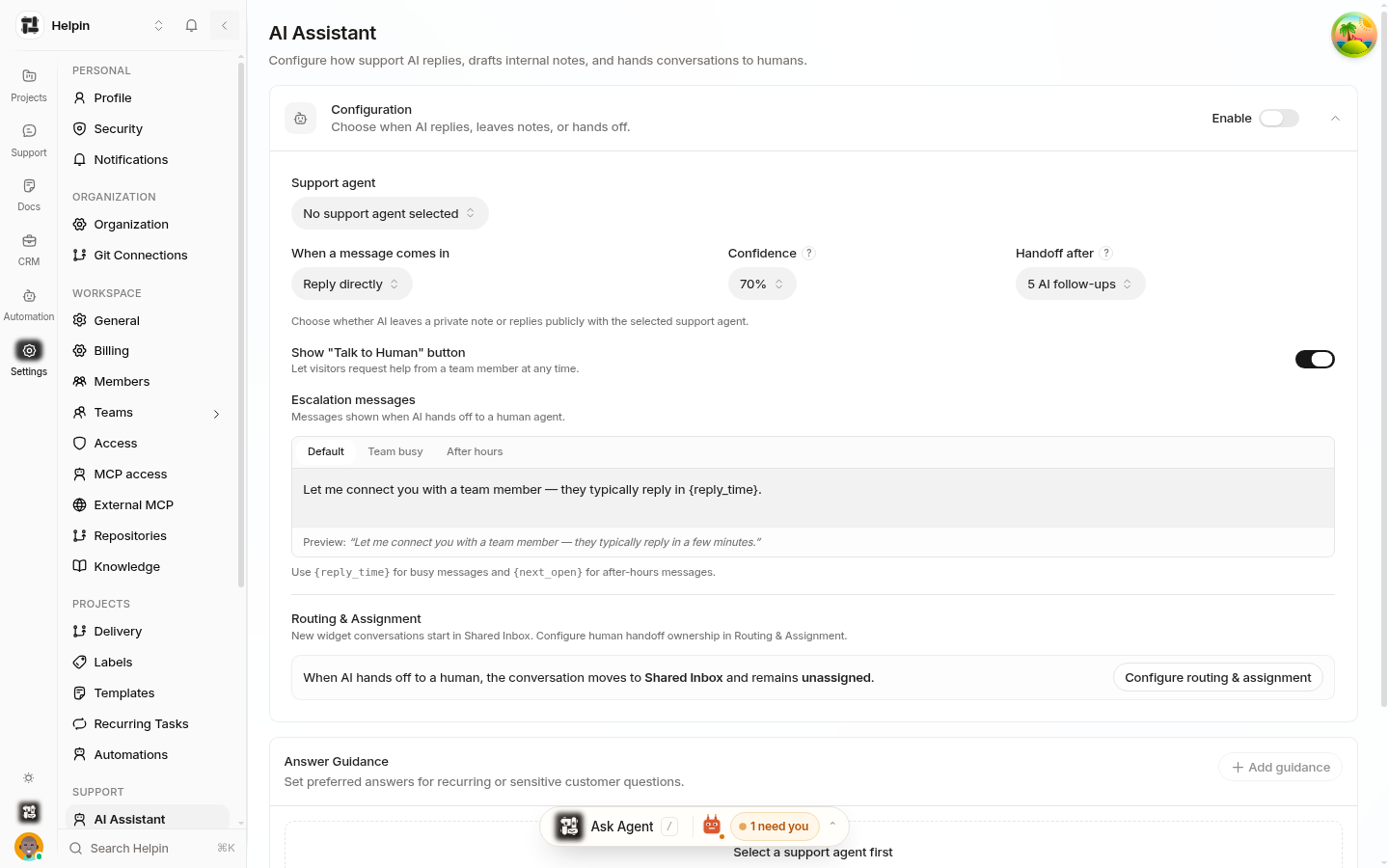
Core configuration (Settings → AI Assistant)
Enable — the master switch.
Support agent — which configured support agent persona handles conversations.
When a message comes in — Reply directly (public AI answer) or Add internal note (private note for agents).
Confidence — the threshold (10%–100%) below which the AI hands off instead of answering.
Handoff after — how many AI follow-ups on the same problem (1–10) before a forced handoff; the count resets when the visitor raises a new problem.
Escalation messages — per-scenario customer-facing copy: Default, Team busy, After hours.
Routing & assignment — links to where handoffs go (see Inboxes / routing settings).
Guidance — per-agent instructions for tone and behavior (see Support AI assistant configuration).
The sections in this collection
Knowledge-base answers — how retrieval over your content works.
AI answer citations & source transparency — how sources are shown.
AI clarifying questions — disambiguation before answering.
Handoff to human agents — escalation mechanics.
Stuck detection & same-issue handoff — when the AI gives up.
Escalation rules — instant handoff categories.
AI response modes & follow-up limits — reply vs. note, limits.
Support AI settings — where AI settings live.
Support AI assistant configuration — personas and guidance.
Was this article helpful?